






 Time: 2026-06-24
  Views: 521

[Foreword]
Decision has been deeply involved in the SAP field for more than 20 years and has been praised by many customers. In order to better help customers implement digital projects, the "Decision Expert Column" is completely free and open source, paying tribute to Musk's open source spirit!
Based on the senior capabilities of Decision's expert consultant team with more than 20 years of SAP experience, combined with Decision's 1,000+ successful project cases, this article summarizes and publishes the corresponding research experience and suggestions of enterprises in promoting ERP project implementation, and continues to escort the SAP implementation and delivery of enterprises.
[Requirement Description]
When the production workshop issues the work orders for material input, the BACKFLUSH method is adopted, which means: based on the reported quantity and the BOM standard usage, the materials are automatically input into the production orders. However, during the end-of-period inventory count, inventory discrepancies will occur. The quantities and amounts of these discrepancies need to be allocated according to the quantity of materials input into the production orders in the current month. The advantage of this approach is that the material usage and material cost amounts are more accurately recorded in the production orders (true restoration: cost components such as material labor costs, etc., and material input-output losses).
Therefore, SAP has the function DUV (Distribution of Usage Variances), which is specifically designed to handle the allocation of this variance. Note: Only the inventory discrepancies at the production site are applicable for this processing. For those unrelated to production consumption: inventory overages and shortages in the finished goods warehouse, and inventory overages and shortages in non-production-related MRO (Maintenance, Repair & Operations) items, are not applicable to DUV.
[System Configuration]
Note: Although the DUV function is designed to serve the purpose of actual cost accounting, whether to activate the material ledger or not does not affect the use of the DUV function.
1. Activation of basic functions - Transaction code
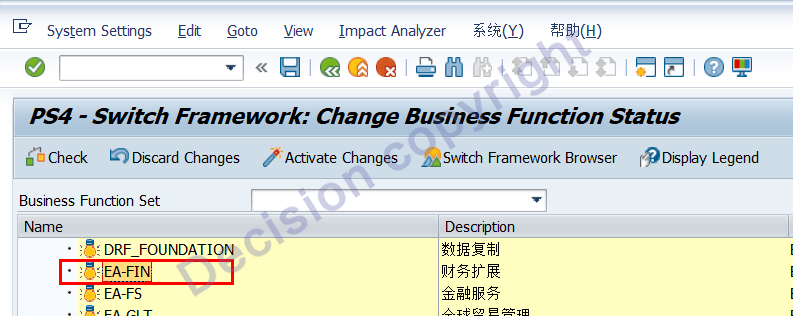
In the earlier versions of SAP (prior to SAP_FIN 730), EA-FIN needed to be activated. In the subsequent versions, it was activated by default.

ENTERPRISE_EXTENSIONS->EA-FIN
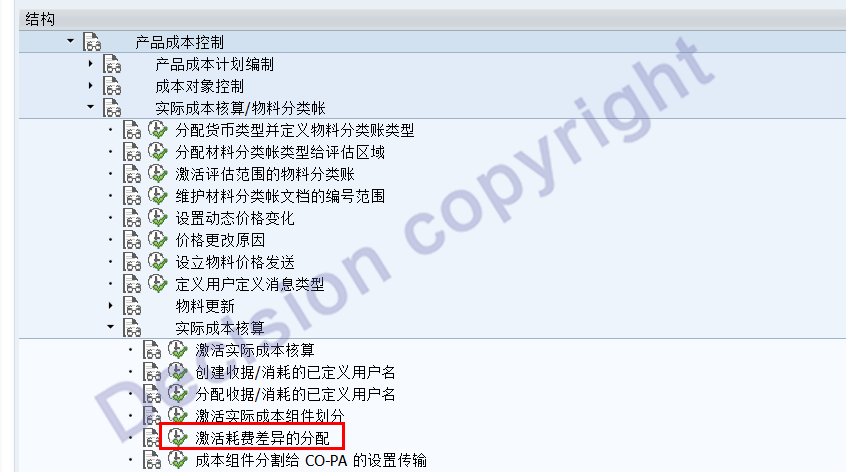
2. Specify the activation of the DUV transaction code SM30 by "factory + location" and view CKMLDUVN001L.
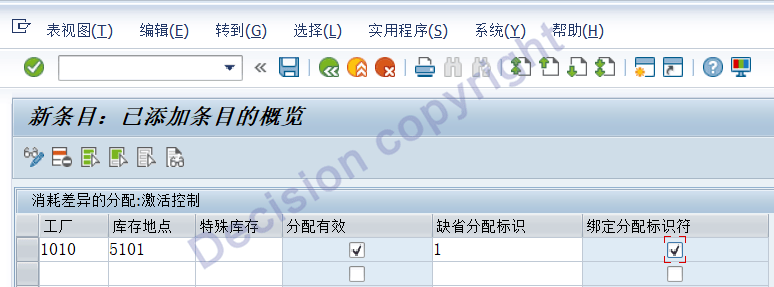
Configuration Instructions:
Effective allocation: Refers to whether the DUV function has been activated
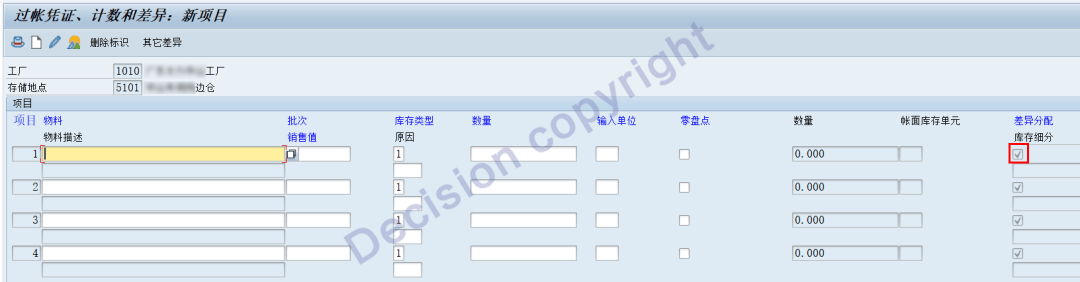
Default allocation flag: When creating a stocktaking voucher, is the DUV flag automatically enabled for the items in the stocktaking voucher row?
Binding allocation identifier: For the default enabled DUV or disabled DUV binding in the inventory voucher line items, manual modification is not allowed.
Attached: For the inventory voucher line items, when the default allocation flag is 1, the variance allocation is X; when the default allocation flag is blank, the variance allocation is blank.
3. Mobile type-related configuration
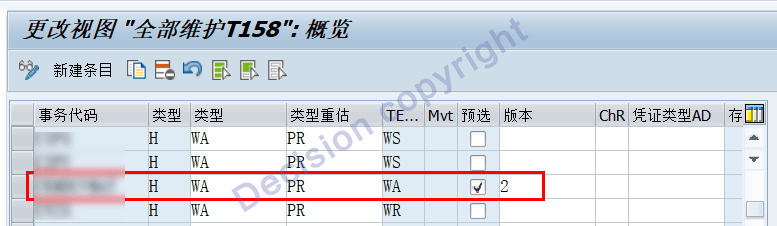
Add the transaction code in the mobile type configuration. The transaction code SM30 is displayed in the view V_158_ALL (in subsequent versions, SAP has added it by default)
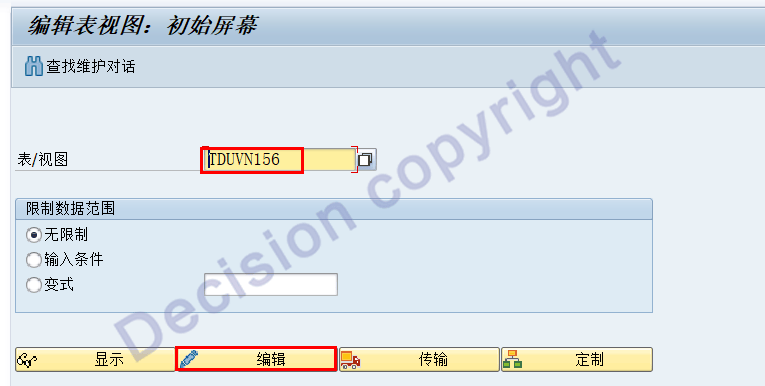
(2) Specify the base movement type for DUV allocation. The transaction code SM30 displays the view TDUVN156.
Here you can specify on which basis the collected differences are analyzed according to the types of movement and transmission.
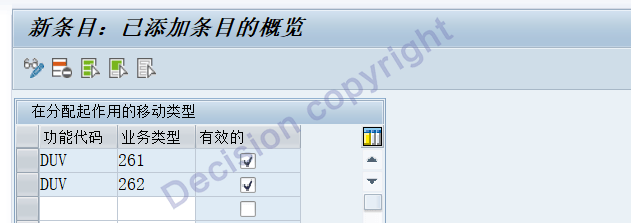
Usually, the inventory variance is allocated based on the actual quantity of materials input as per the work order, which is 261/262.
(3) Create variance allocation movement type Transaction code: OMJJ
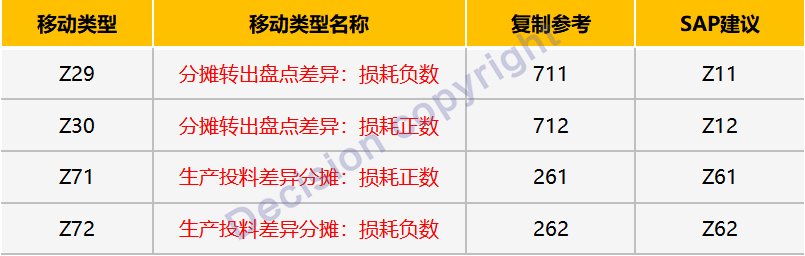
Note: To account for the WM (Warehouse Management System) inventory check, Z29 duplicates 711 instead of 701.
For the overstock, the negative value of the loss is transferred out through the Z29 movement type: 701, 703, 707, 712, 714, 716, 718 -> Z29
For inventory write-downs, the losses are transferred out by changing the Z30 movement type: 702, 704, 708, 711, 713, 715, 717 -> Z30
For the negative value of Z29 loss, it is transferred to the work order through the Z72 movement type: Z29 -> Z72 (or 262)
For the positive Z30 loss, it is transferred to the work order through the Z71 movement type: Z30 -> Z71 (or 261)
A. After creating the mobile type Z29 and duplicating the 711 mobile, please pay attention to modifying the content as shown in the red boxes below:
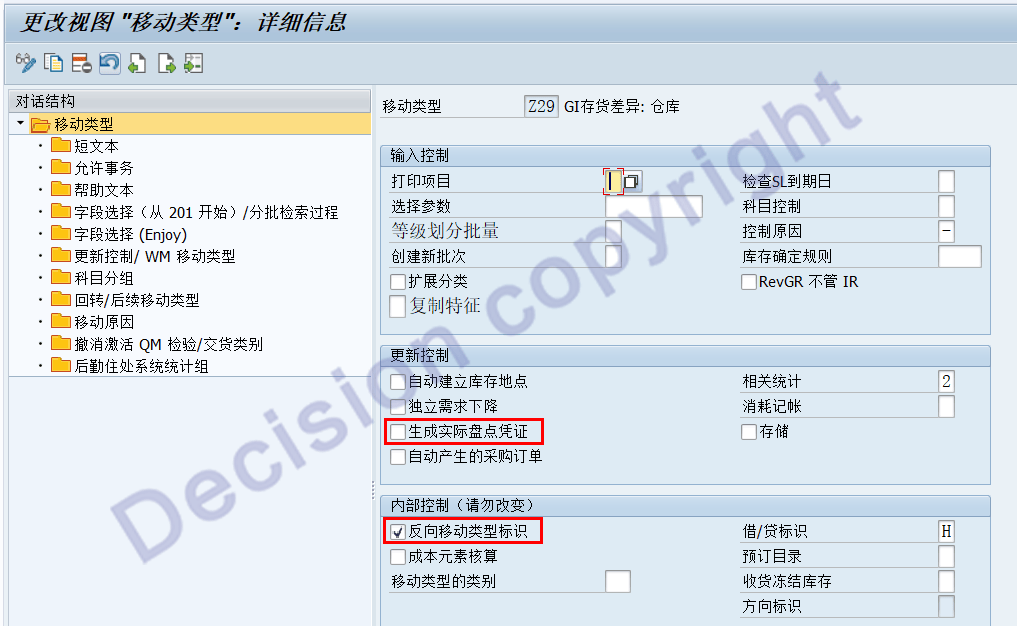
Among them: Uncheck the option "Generate actual inventory vouchers". This movement type cannot be used to create inventory vouchers.
Among them: Check the "Reverse Movement Type Identifier" option. This movement type will be processed as negative numbers 701 and 711.
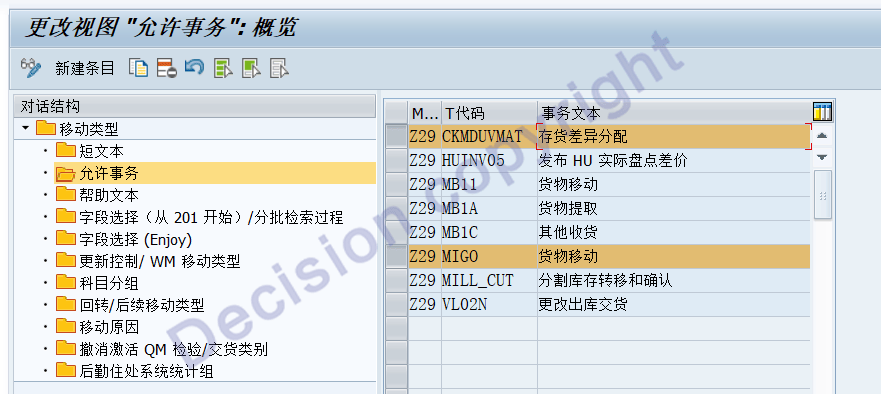
According to the above diagram, add two transaction codes: CKMDUVMAT and MIGO.
CKMDUVMAT indicates that the Z29 allocation transfer posting can be handled through the CKMDUVMAT transaction code.
MIGO states that the reversal of the Z29 allocation transfer entry can be handled using the MIGO transaction code.
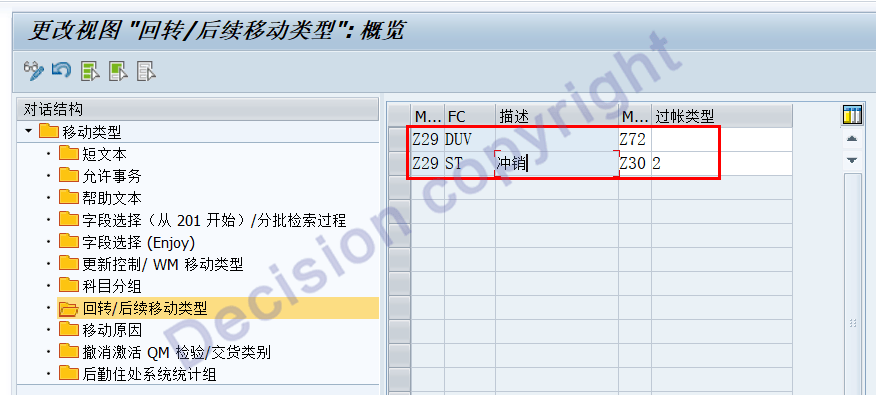
As shown in the above figure: Z29 DUV is allocated to the work order corresponding to Z72, and the Z29 write-off is recorded as Z30.
B. After creating the mobile type Z30 and duplicating the 712 mobile, please pay attention to modifying the content as shown in the red boxes below:
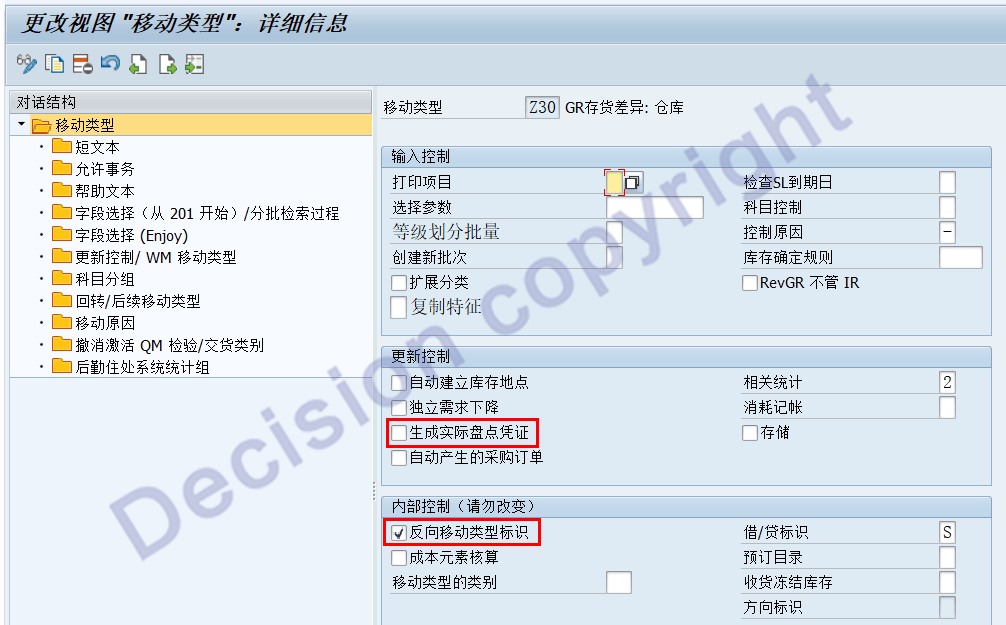
Among them: Uncheck the option "Generate actual inventory vouchers". This movement type cannot be used to create inventory vouchers.
Among them: Check the "Reverse Movement Type Identifier" option. This movement type will be processed as negative numbers of 702 and 712.
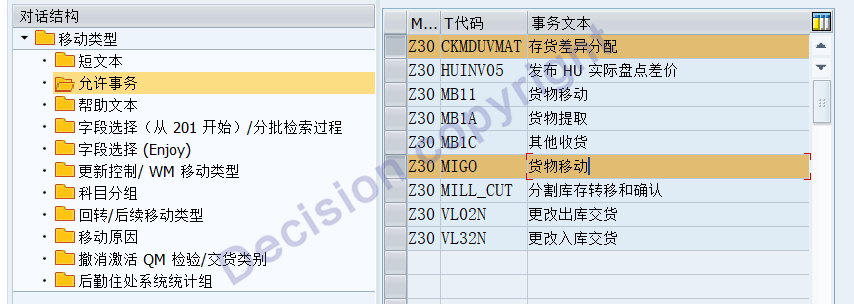

As shown in the above figure: Z30 DUV is allocated to the work order corresponding to Z71, and Z30 write-off is accounted for as Z29.
C. After creating the mobile type Z71 and duplicating the 261 mobile, please pay attention to modifying the content as shown in the red boxes below:
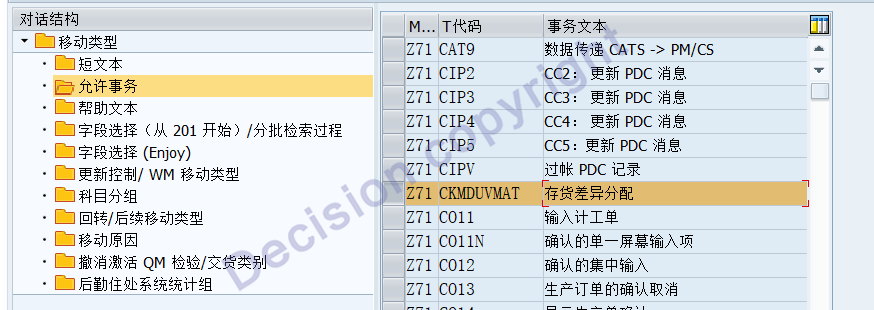
According to the above diagram, add two transaction codes: CKMDUVMAT and MIGO.
CKMDUVMAT indicates that the Z71 allocation transfer work order posting is handled through the CKMDUVMAT transaction code.
MIGO stated that the reversal of the Z71 allocation transfer entry can be handled using the MIGO transaction code.
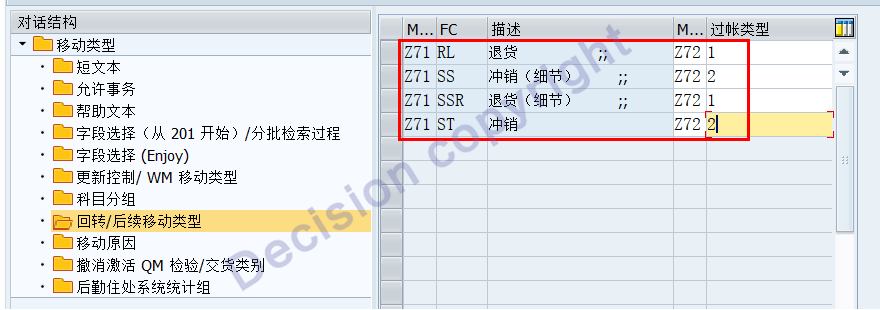
As shown in the above figure: The corresponding posting for the Z71 write-off is Z72.
D. After creating the "Z72" mobile type and making a copy of the "262" mobile, please pay attention to modifying the content as shown in the red boxes below:
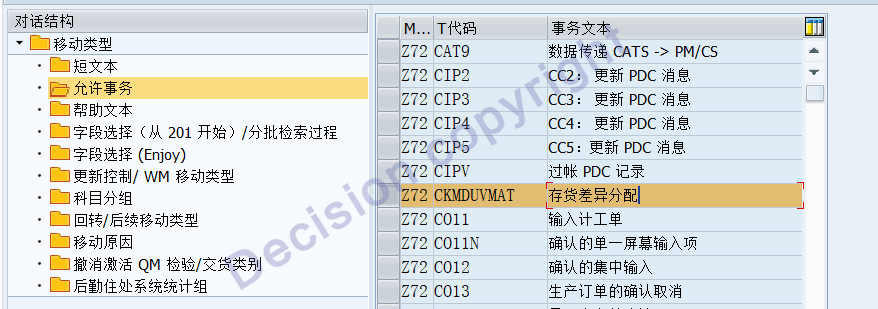
According to the above diagram, add two transaction codes: CKMDUVMAT and MIGO
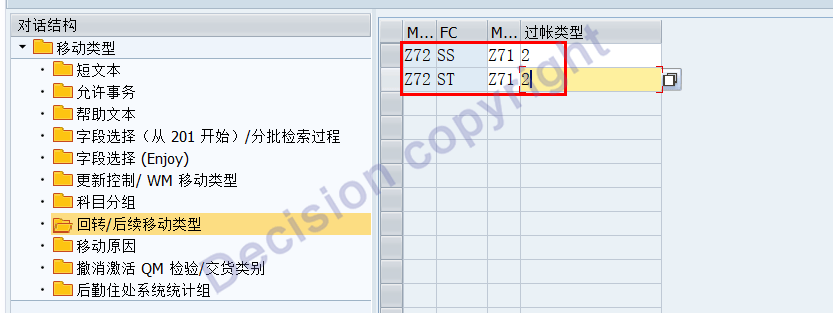
E. Assign subsequent processing for mobile types: 701, 703, 707, 712, 714, 716, 718 -> Z29
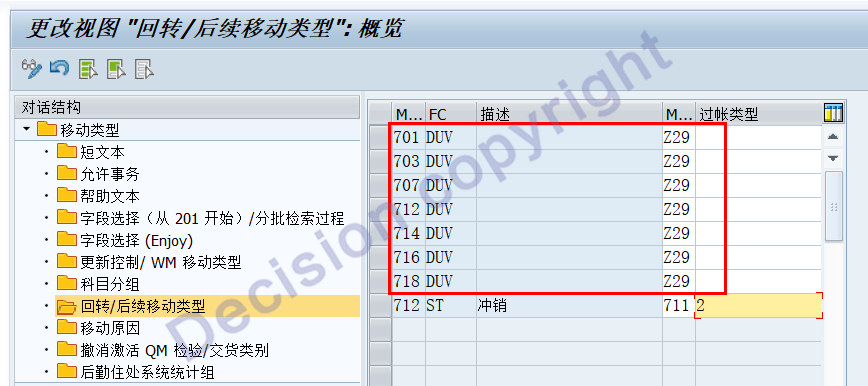
F. Assign subsequent processing for mobile types: 701, 703, 707, 712, 714, 716, 718 -> Z29
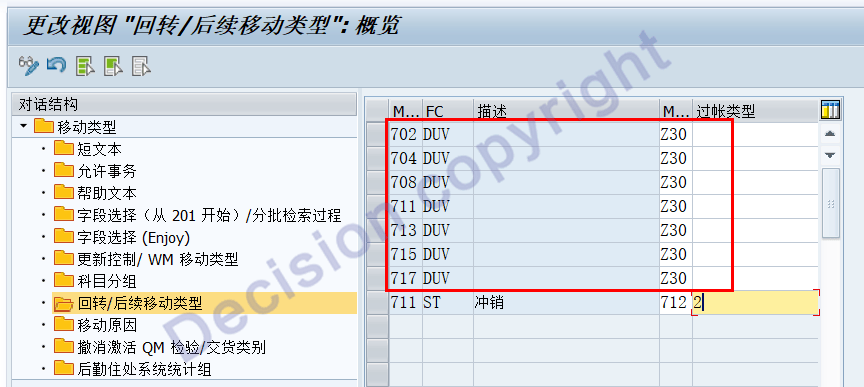
[Scenario Testing]
1. Create inventory vouchers and post the transactions. Refer to the following transaction codes:

MI09 = MI01 + MI04
MI08 = MI04 + MI07
MI10 = MI01 + MI04 + MI07
The test inventory of the two journal entries is as follows:
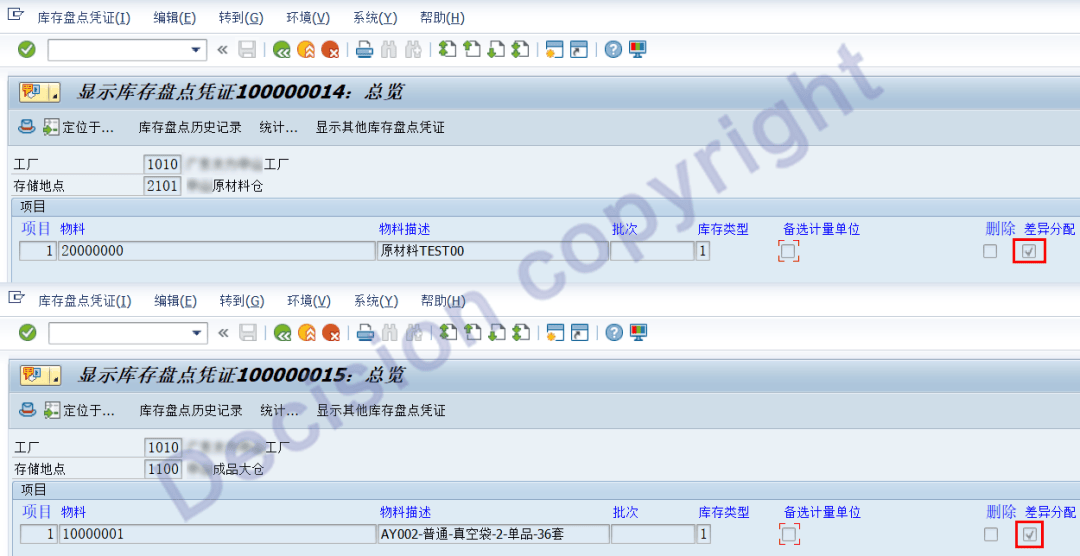
2. After the data was posted, the records in the data table are as follows:
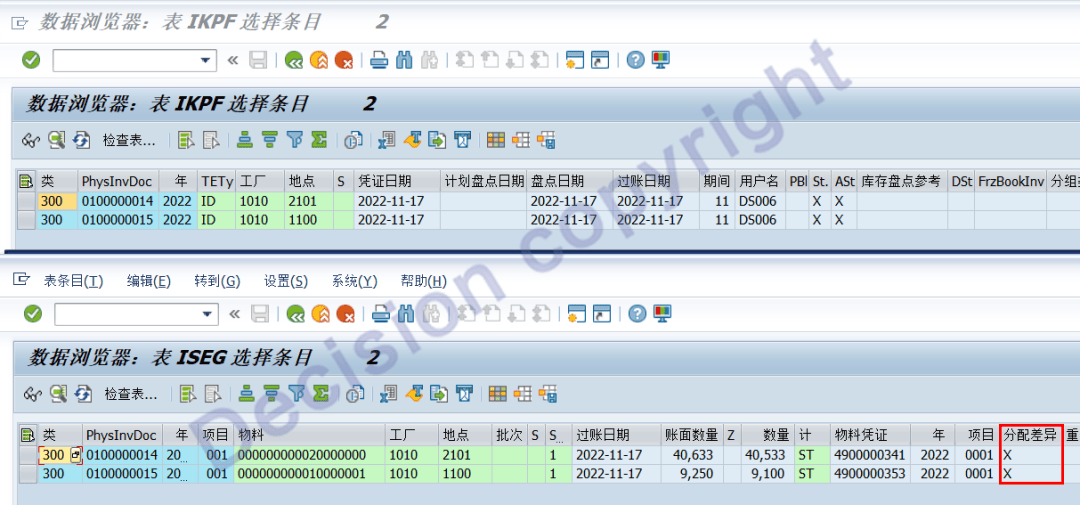
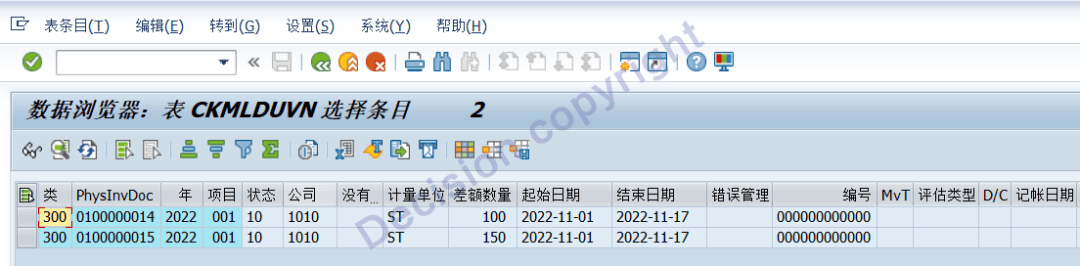
The system not only records the outstanding inventory discrepancies in the IKPF ISEG table, but also in the data table CKMLDUVN.
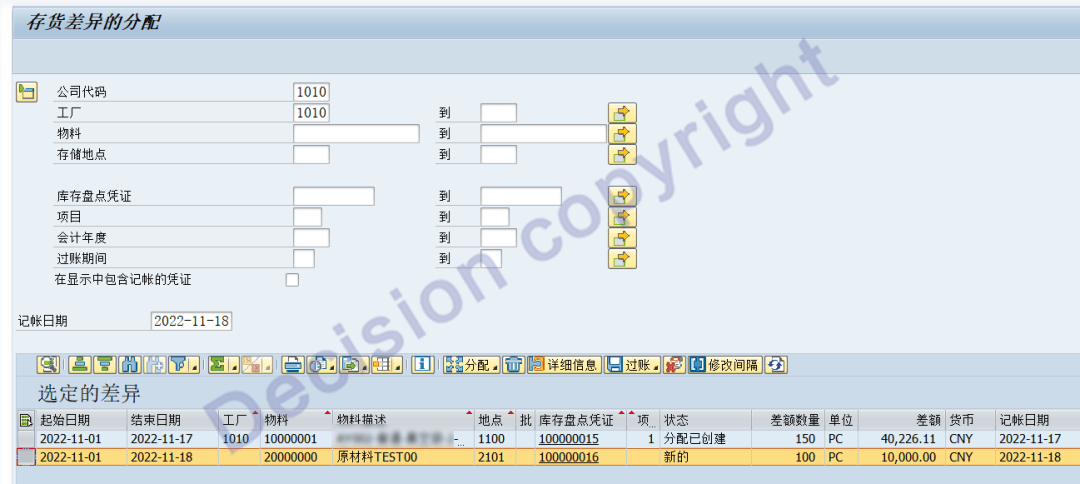
3. Carry out the allocation of inventory discrepancies, transaction code: CKMDUVMAT
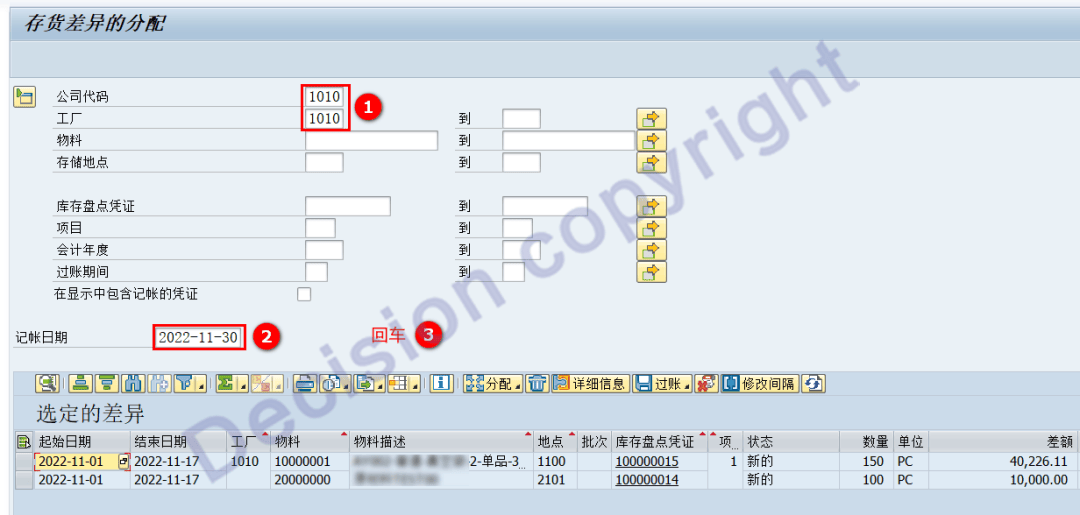

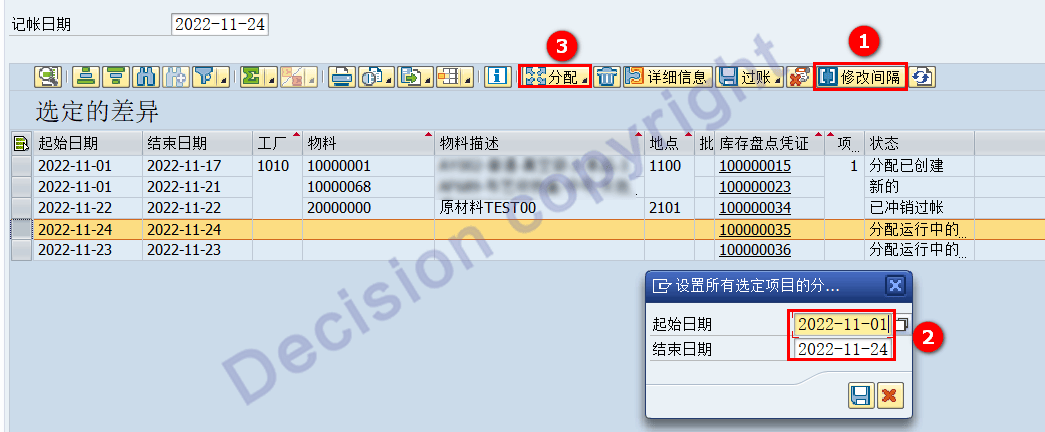
Select all the items, then click: Allocate to Order.

As shown in the above picture, it can be seen that the inventory discrepancy status has changed to: Allocation has been created.
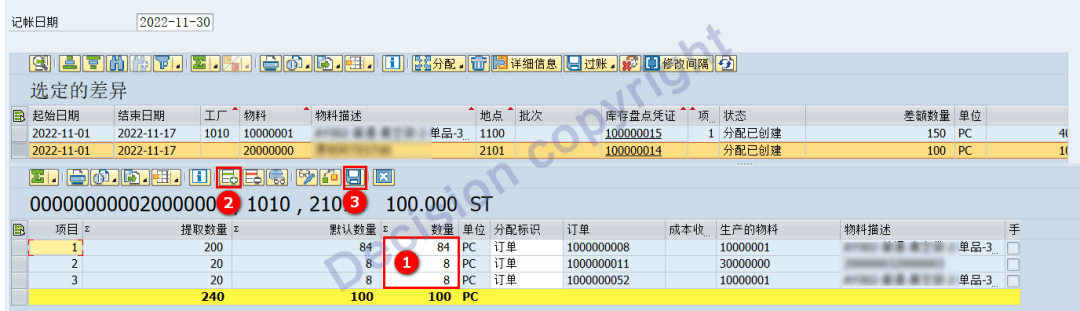
As shown in the above figure: The system automatically allocates the input quantities of 261/262 to the production orders. At the same time, manual adjustments are allowed, and additional rows can be added to enable allocation to other production orders. After processing, the "Save" button needs to be clicked.
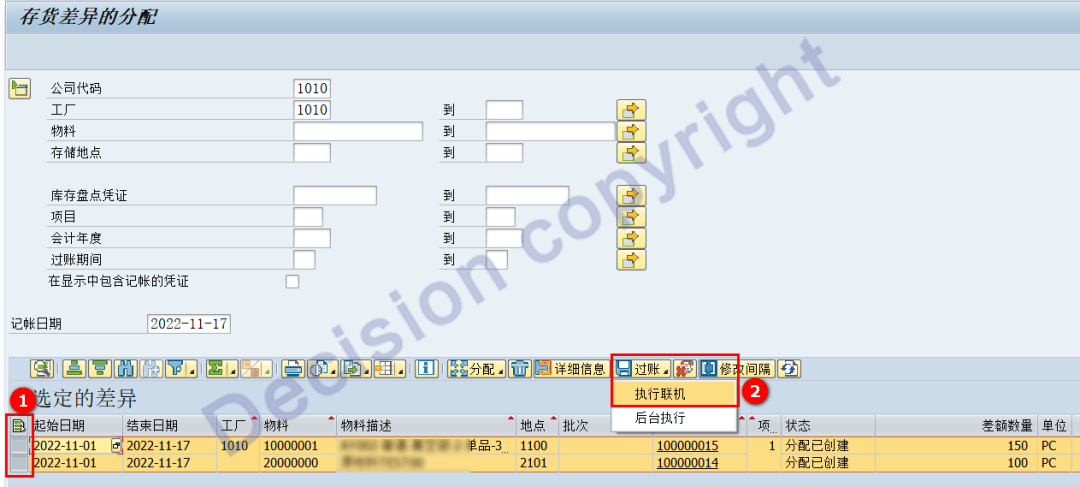
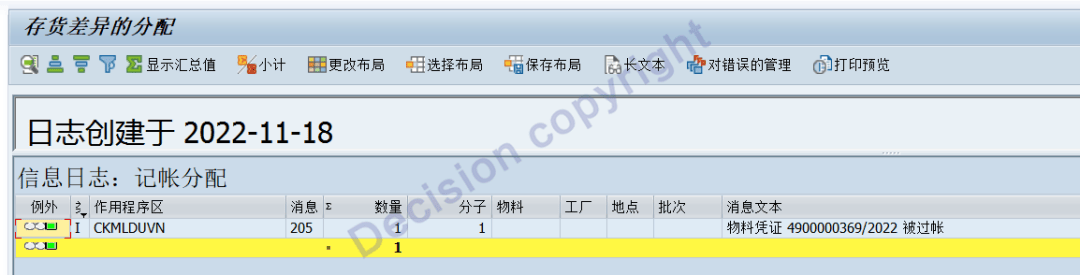
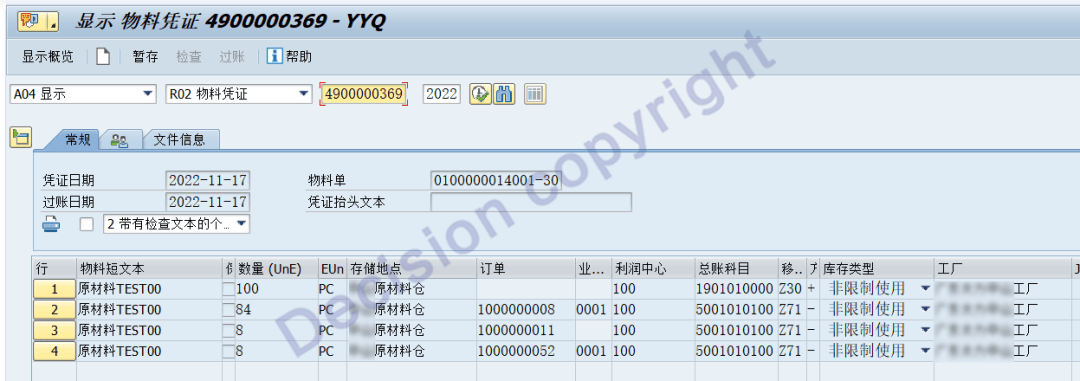
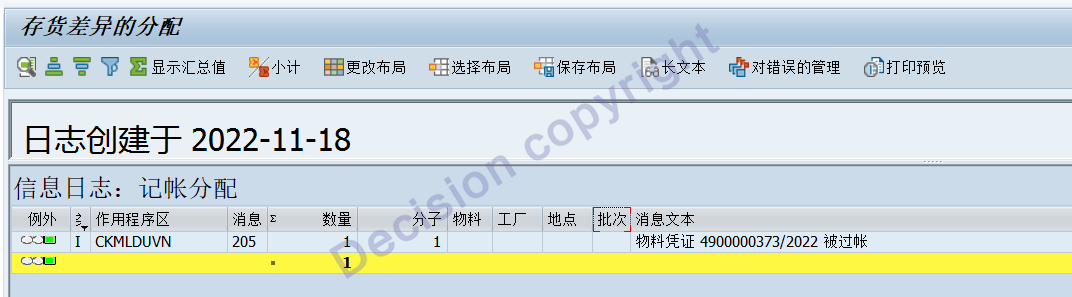
As shown in the above figure, the posting has been performed. After the posting, the system displays the posting voucher number. You can view the voucher line items through MIGO.
By reviewing CKM3N, it can be seen that the system has made adjustments to Z30 to transfer the 702 inventory write-down difference as follows:

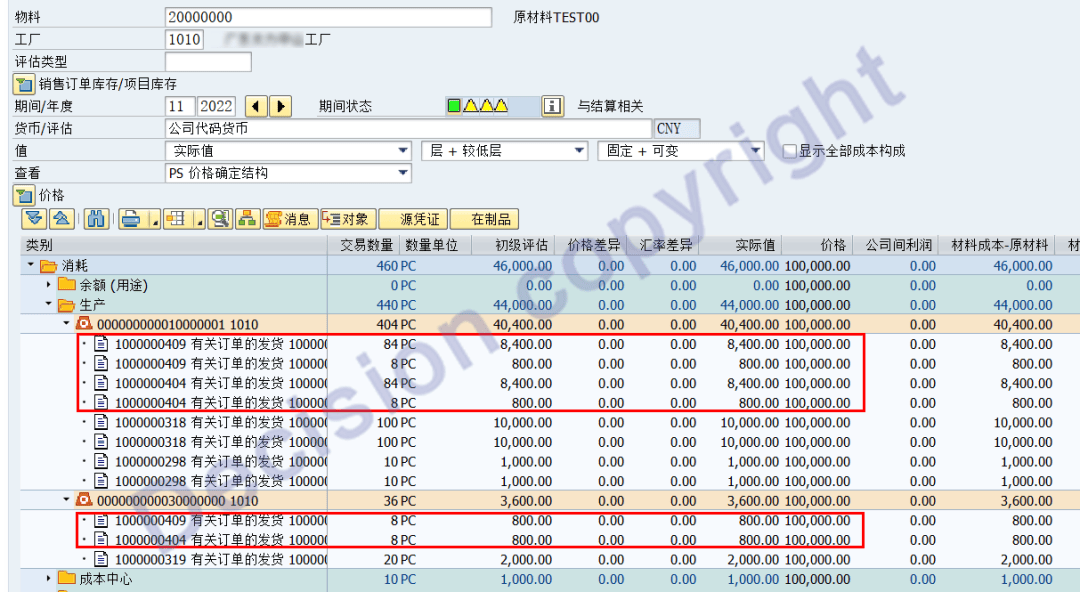
Meanwhile, the costs are allocated and transferred to production as follows:
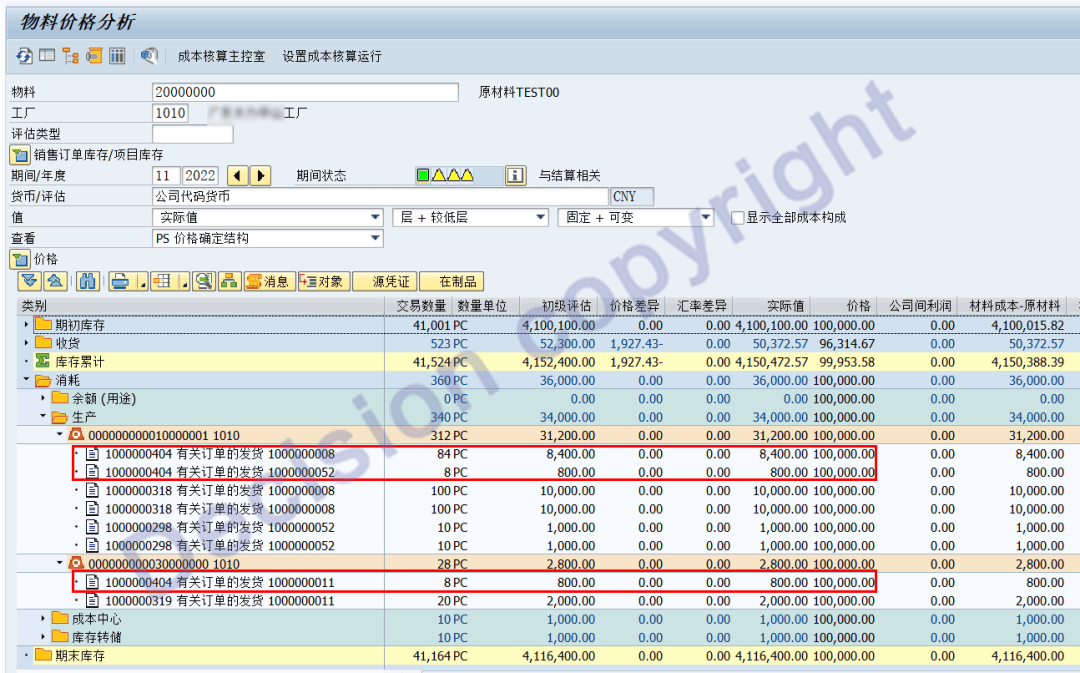
Additional note: If there is a discrepancy in the current inventory of materials 701 and 702, and no corresponding production inputs of 261 and 262 have been made, manually add a new row.

After manual supplementation, the accounts were posted, and the program DUMP read ct_imseg.
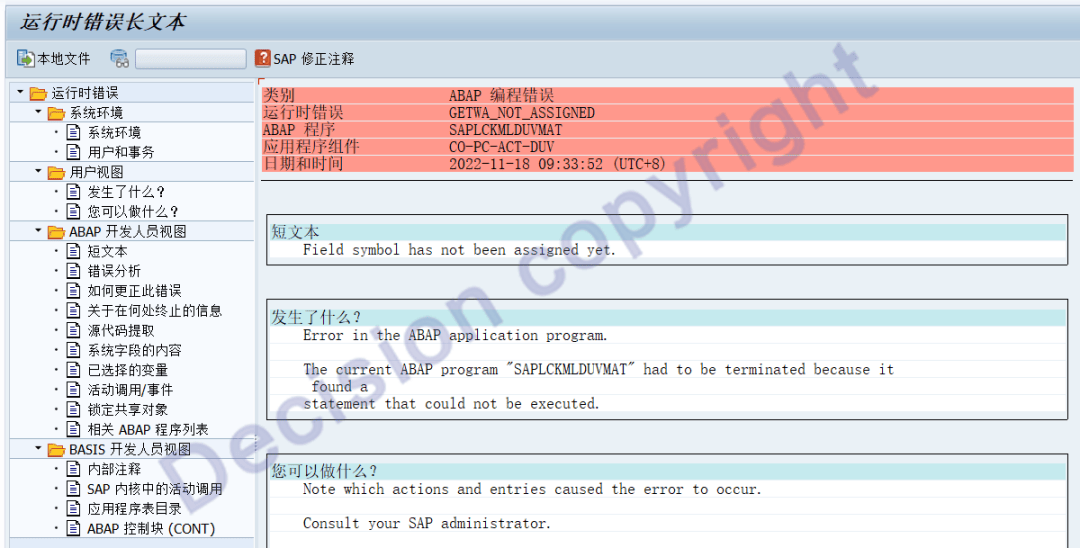
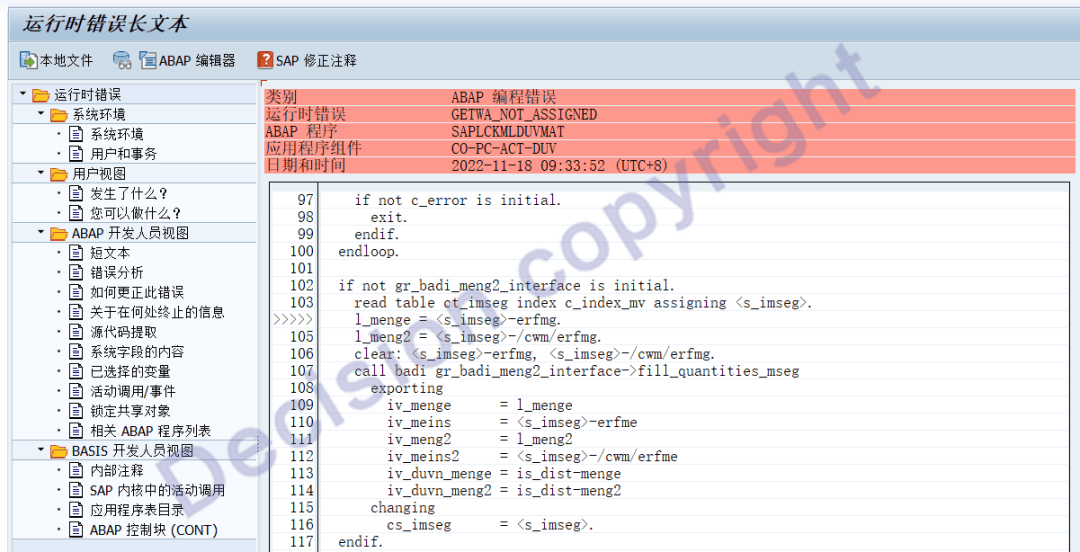
Program: LCKMLDUVMATF06. An error occurred when reading the base allocation movement voucher.
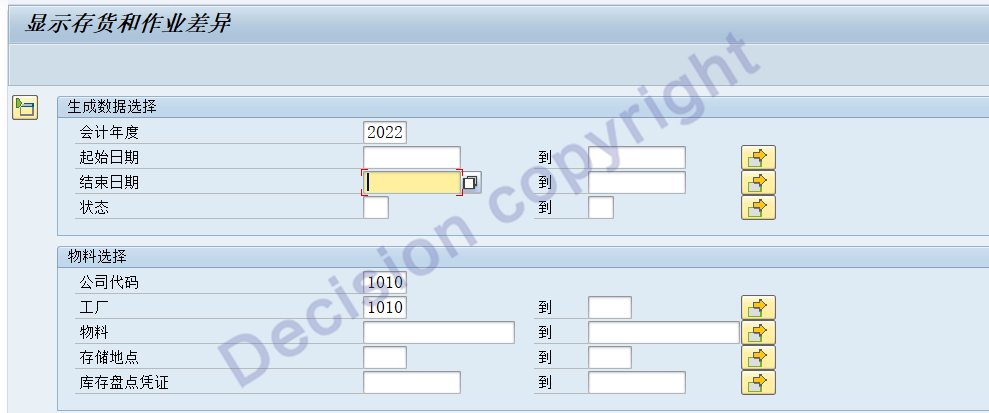
4. Query the record of inventory variance allocation, transaction code: CKMDUVSHOW
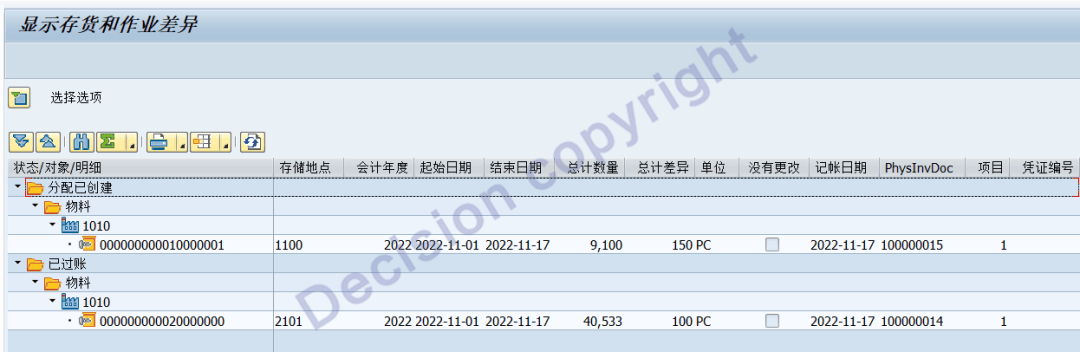
5. Question to consider: If the inventory count directly uses MIGO to handle 702 and 701, can the differences be allocated using DUV?
Theoretically, it is possible.
Transaction code MIGO is used to directly handle the inventory variance of 702 and 701.

(2) Develop the program and update the records in the IKPF/ISEG/CKMLDUVN tables
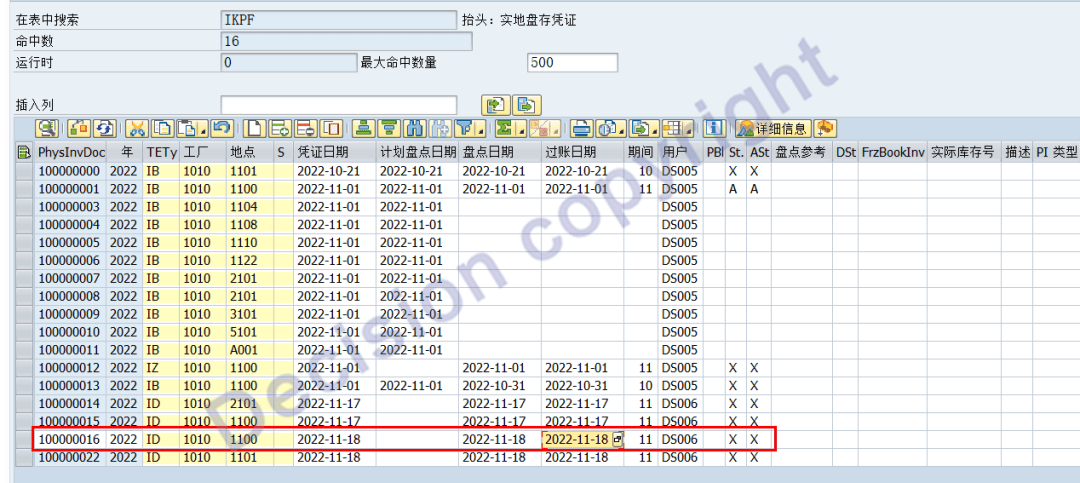
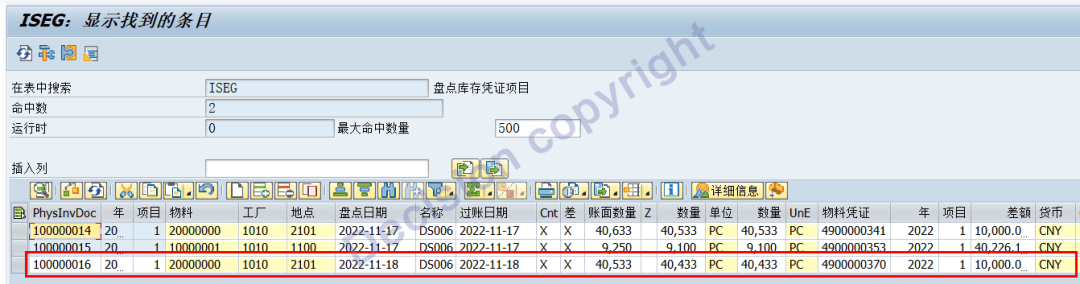
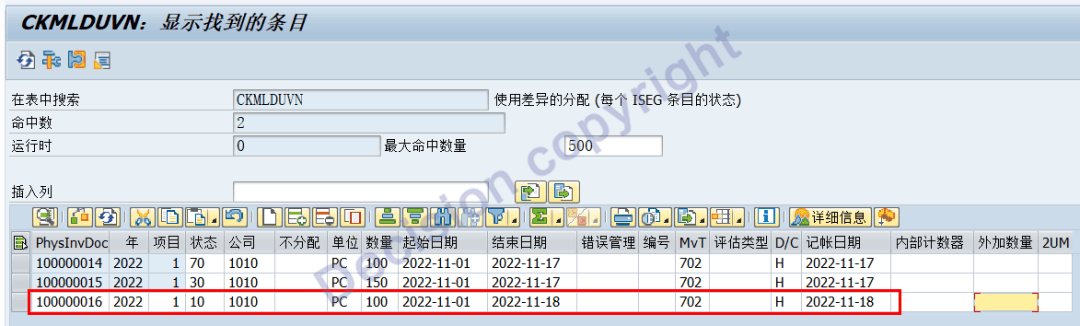
(3) Transaction code CKMLDUVN is used to allocate inventory variance.
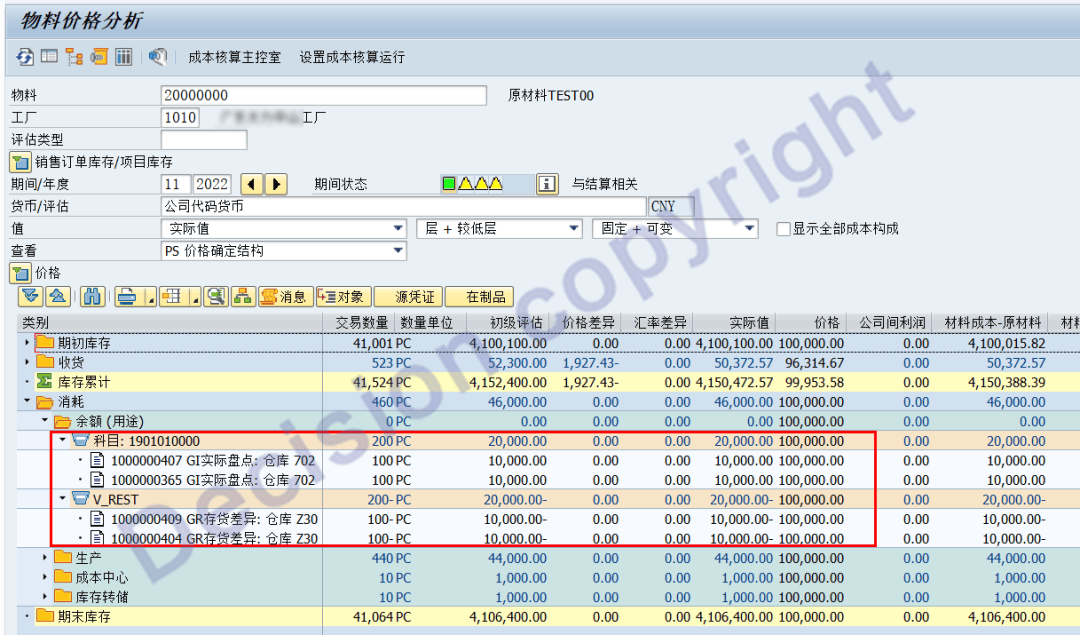
(4) The transaction code CKM3N is used to view the results of the material ledger.
It can be seen that there are two instances of inventory write-down: one was handled through the MI* series transaction codes, and the other was directly processed through the MIGO transaction code. Both were successfully allocated through the transaction code CKMLDUVN!
Summary:
A. If the inventory variance 701/702 is directly posted through MIGO, then IKPF/ISEG/CKMLDUVN needs to be supplemented. After supplementation, the DUV function can be used to allocate the variance.
Note: When supplementing the IKPF/ISEG table to record the inventory voucher number, you need to obtain the MATBELEG object number through the system function. Do not randomly write the inventory voucher number!!!
B. For the inventory variance to be allocated in the current month, there must be corresponding 261/262 input materials as the basis. Otherwise, the program will run in DUMP mode.
Attachment:
The transaction code CKMDUVMAT is set to handle and view the unposted data. The time period is from the beginning of the month to the current specified date.
If you want to view the entries that have been posted, please check the following options:
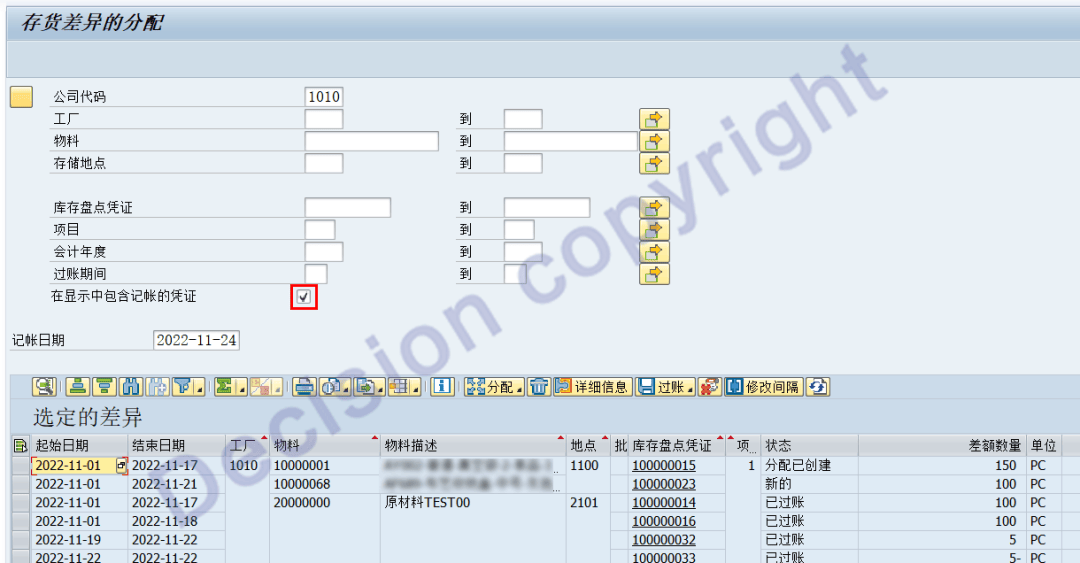
2. Before creating the allocation in transaction code CKMDUVMAT, a date range needs to be specified, which means: which period's 261/262 posting data to take.
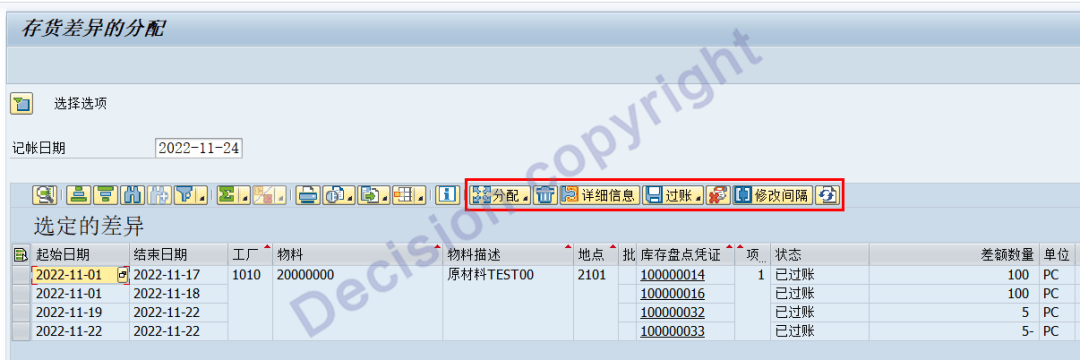
3. When using transaction code CKMDUVSHOW to query the DUV allocation results, there are functional processing buttons on the data screen. Among them: Posting and reversing posting cannot be processed by the system because in the OMJJ transaction code, there is no permission for the CKMDUVSHOW transaction code to handle them.
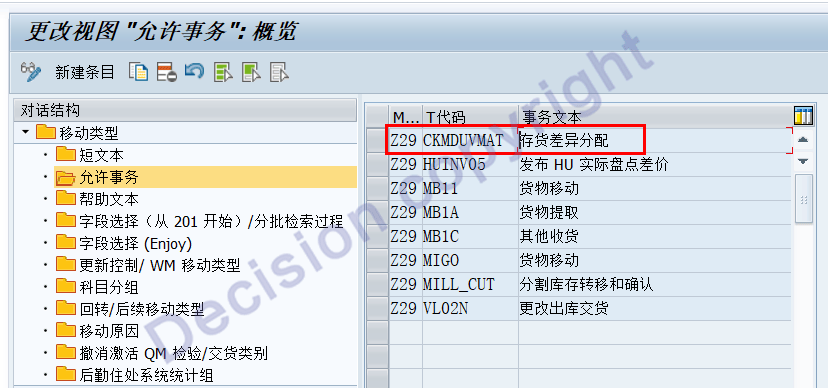
In the transaction code OMJJ, the Z29/Z30 movement is only allowed to be processed by CKMDUVMAT and not by CKMDUVSHOW. If it is allowed, CKMDUVSHOW would not merely be a viewing function.
Related data table:
CKMLDUVN001L Allocation of consumption variance: Activation control
CKMLDUVN uses the differential allocation (the status of each ISEG entry)
The differences in the allocation objects used for each subject of CKMLDUVNCO
NOTES:
1369514 - DUV INFO: Activation steps
645739 - Transaction types for DUV
939881 - Missing DUV documents- materials with serial number profile
2776096 - INFO: Error KI 153 during CKMDUVACT posting
Question 1:
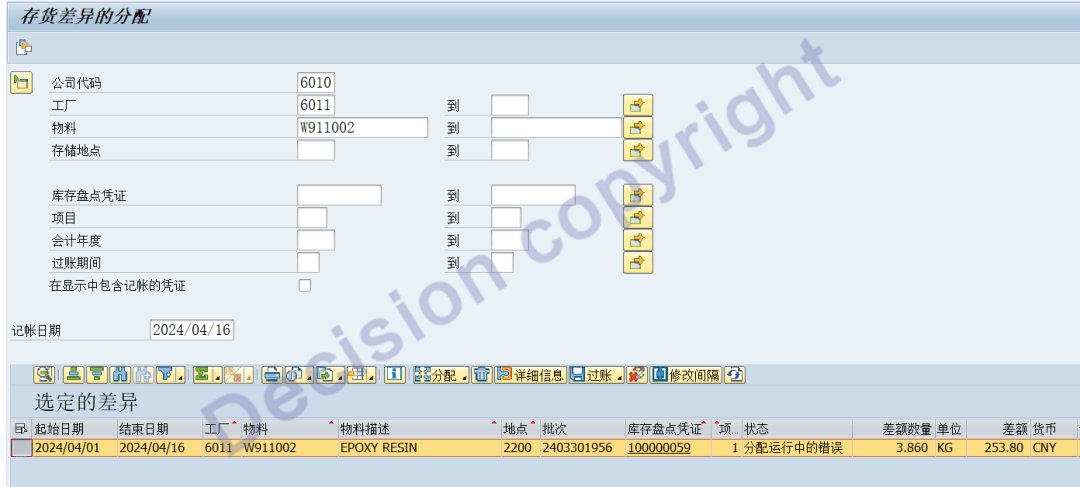
Material W911002, factory 6011. This month, there was only inventory loss, and no production input was made for 261 and 262. Therefore, CKMDUVMAT has been showing as unallocated. How should we handle this?
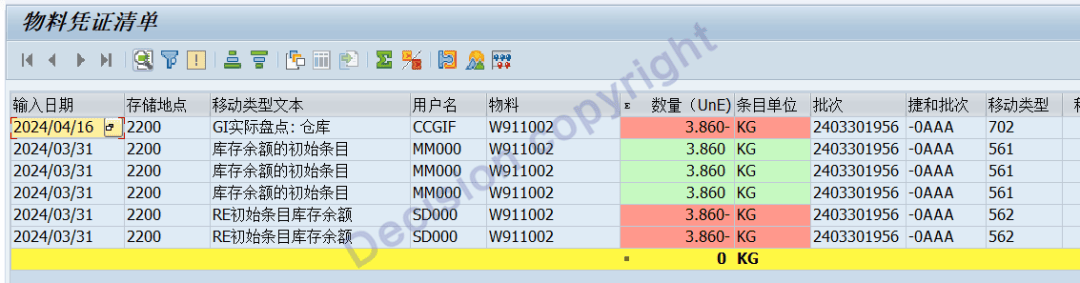
The transaction code CKMDUVMAT has always shown "not allocated".
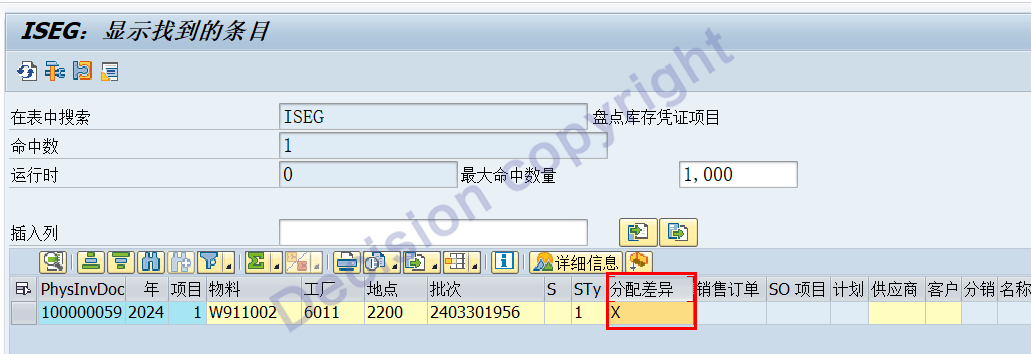
Handle the development function and clear the ISEG-XDISPATCH field.
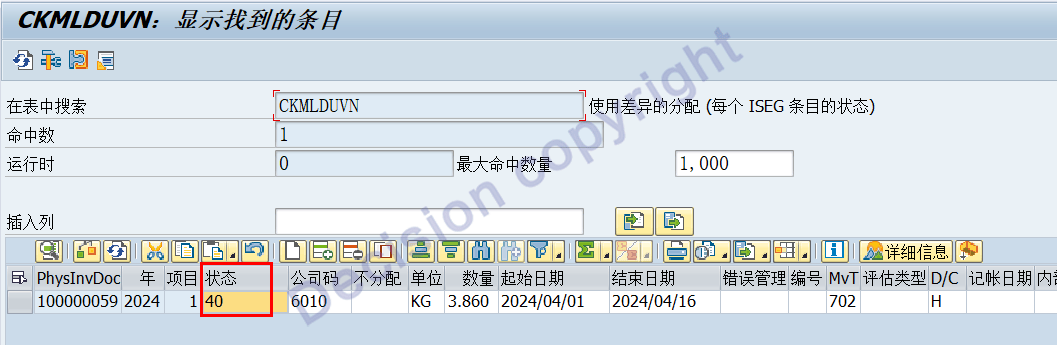
CKMLDUVN-STATUS has been changed to status 70.
【Service Guide】
For more information on SAP courses, project consultation and operation and maintenance, please call Decision's official consultation hotline: 400-600-8756

【About Decision】
Global professional consulting, technology and training service provider, SAP gold partner, SAP software partner, SAP implementation partner, SAP official authorized training center. Twenty years of quality, trustworthy!